Package
Python - Packages
Section titled “Python - Packages”We organize a large number of files in different folders and subfolders based on some criteria, so that we can find and manage them easily. In the same way, a package in Python takes the concept of the modular approach to next logical level. As you know, a module can contain multiple objects, such as classes, functions, etc. A package can contain one or more relevant modules. Physically, a package is actually a folder containing one or more module files. module Let’s create a package named mypackage, using the following steps:
- Create a new folder named D:\MyApp.
D:\MyApp- Inside MyApp, create a subfolder with the name ‘mypackage’.MyApp- Create an empty init.py file in the mypackage folder.__init__.py- Using a Python-aware editor like IDLE, create modules greet.py and functions.py with the following code:
def SayHello(name): print("Hello ", name)def SayHello(name): print("Hello ", name)
def sum(x,y):    return x+y
def average(x,y):    return (x+y)/2
def power(x,y):    return x**y
`def sum(x,y): return x+y
def average(x,y): return (x+y)/2
def power(x,y): return x**y` That’s it. We have created our package called mypackage. The following is a folder structure:
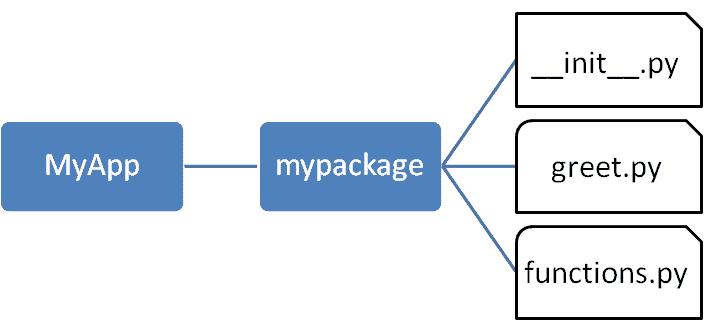
Importing a Module from a Package
Section titled “Importing a Module from a Package”Now, to test our package, navigate the command prompt to the MyApp folder and invoke the Python prompt from there.
MyApp
Import the functions module from the mypackage package and call its power() function.
It is also possible to import specific functions from a module in the package.
init.py
Section titled “init.py”The package folder contains a special file called init.py, which stores the package’s content. It serves two purposes:
__init__.py1. The Python interpreter recognizes a folder as the package if it contains init.py file.
__init__.py1. init.py exposes specified resources from its modules to be imported.
__init__.py
An empty init.py file makes all functions from the above modules available when this package is imported. Note that init.py is essential for the folder to be recognized by Python as a package. You can optionally define functions from individual modules to be made available.
__init__.py``__init__.py
We shall also create another Python script in the MyApp folder and import the mypackage package in it. It should be at the same level of the package to be imported.
MyApp
The init.py file is normally kept empty. However, it can also be used to choose specific functions from modules in the package folder and make them available for import. Modify init.py as below:
__init__.py``__init__.py
from .functions import average, powerfrom .greet import SayHellofrom .functions import average, power from .greet import SayHello
The specified functions can now be imported in the interpreter session or another executable script.
Create test.py in the MyApp folder to test mypackage.
test.py``MyApp
from mypackage import power, average, SayHelloSayHello()x=power(3,2)print("power(3,2) : ", x)from mypackage import power, average, SayHello SayHello() x=power(3,2) print("power(3,2) : ", x)
Note that functions power() and SayHello() are imported from the package and not from their respective modules, as done earlier. The output of the above script is:
power()``SayHello()
Install a Package Globally
Section titled “Install a Package Globally”Once a package is created, it can be installed for system-wide use by running the setup script. The script calls setup() function from the setuptools module.
setup()``setuptools
Let’s install mypackage for system-wide use by running a setup script.
Save the following code as setup.py in the parent folder MyApp. The script calls the setup() function from the setuptools module. The setup() function takes various arguments such as name, version, author, list of dependencies, etc. The zip_safe argument defines whether the package is installed in compressed mode or regular mode.
MyApp``setup()``setup()``zip_safe
from setuptools import setupsetup(name='mypackage',version='0.1',description='Testing installation of Package',url='#',author='auth',author_email='[email protected]',license='MIT',packages=['mypackage'],zip_safe=False)from setuptools import setup setup(name='mypackage', version='0.1', description='Testing installation of Package', url='#', author='auth', author_email='[email protected]', license='MIT', packages=['mypackage'], zip_safe=False)[email protected]
Now execute the following command to install mypackage using the pip utility. Ensure that the command prompt is in the parent folder, in this case D:\MyApp.
mypackagepipD:\MyApp
Now mypackage is available for system-wide use and can be imported in any script or interpreter.
You may also want to publish the package for public use. PyPI (stands for Python Package Index) is a repository of Python packages. Visit https://packaging.python.org/distributing to know more about the procedure of uploading a package to PyPI. PyPIhttps://packaging.python.org/distributing